
COST TO RUN APPLIANCES
Learn what it costs to run your household appliances with our top viewed guide.

Understanding your electricity usage can help you save money on your next bill. Stay across your usage summary and breakdown.
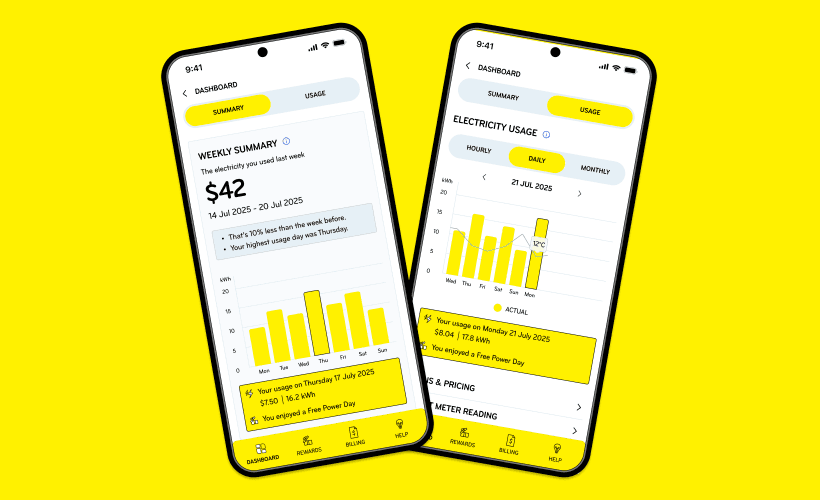
Watch our short video guide to learn how to view your weekly usage comparison and detailed breakdown in the Mercury App. At a computer? Log in to My Account.
Learn what it costs to run your household appliances with our top viewed guide.

Understanding your electricity usage is important. That’s why we’ve moved your weekly summary from emails to the Mercury App so you can view this information sooner. Your weekly summary updates every Wednesday where you’ll receive an app notification to remind you. Using the app means you can also track your hourly and daily usage. Or see when you’ve redeemed a Free Power Day with rewards.
You’ll receive weekly app notifications to help you stay on top of your usage. An app notification is when a message pops up on your phone from Mercury. As long as you have your app notifications turned on, we’ll notify you every Wednesday when your new weekly summary is available. You can manage your app usage notifications under your weekly summary.
Tip: If you currently receive rewards challenge notifications, you’ll receive weekly usage updates.
Your daily, weekly, and monthly usage includes your Daily Fixed Charge (a fixed amount each day), your variable charge (the actual electricity you’ve used), and GST. Your hourly usage only includes your variable charge, and GST. Please note, if you have a legacy meter, or a non-communicating smart meter, you’ll only see your monthly billing breakdown.
If you have redeemed a Free Power Day with rewards, a credit will be applied to your account within 35 days. Your usage breakdown does not include this credit.
Check out our Mercury App and My Account troubleshooting FAQ.
You can stay across your usage using My Account via our website. Log in.