MERCURY MOBILE

The 3G network is closing from March 2026 - check if your device needs upgrading. Learn more.


Woman in blue jeans and a white top is browsing the internet on her mobile phone

SWITCHING HUB.

Discover our helpful guides for switching your broadband or mobile phone service to Mercury.
It might be easier than you think!
SWITCHING GUIDES FOR BROADBAND AND MOBILE
FIBRE BROADBAND
Whether you already have fibre installed at your property or are considering getting connected for the first time, here are the things you need to know.
WIRELESS BROADBAND
Mercury’s Wireless Broadband is available in most places where there is 4G coverage. Find out more about switching your wireless broadband service to Mercury.
MOBILE
Find out all you need to know about switching to Mercury Mobile including keeping your existing phone number and how and when to swap your SIM card.
FIBRE BROADBAND

1. Check your current contract

Want to avoid any surprise fees from your current provider? It's worth taking a few minutes to check your current contract before you make the switch.

Look for things like early termination fees, remaining contract periods, or any exit charges that might apply if you leave before your contract ends.


2. Keen to move to Mercury?

If your place already has fibre, send us your account number with your current provider when you sign up and we’ll handle the transfer. 
You’ll get text updates along the way.

If fibre isn’t connected yet, we can help arrange installation and may offer temporary wireless broadband if available.


3. Decide on your landline needs

You can add a landline to your Mercury broadband. It’s available on both fibre and wireless. You can usually keep your current number; if not, we’ll let you know.


4. Signed up! Now what?

If you opted for a Mercury-supplied eero, you could set it up beforehand. If you’re using your own router, you may need to update its settings once we take over your connection. Note: Speed performance isn’t guaranteed on non-Mercury routers.


WIRELESS BROADBAND

1. Check your current contract


Want to avoid any surprise fees from your current provider? It's worth taking a few minutes to check your current contract before you make the switch.


Look for things like early termination fees, remaining contract periods, or any exit charges that might apply if you leave before your contract ends

2. Check if we can supply wireless broadband to you

You can do this by completing an address check here.

If wireless broadband services appear at the bottom of the second page during sign-up, that means there's capacity available in your area for a wireless broadband connection.

3. Decide on your landline needs

You can add a landline to your Mercury broadband. It’s available on both fibre and wireless. You can usually keep your current number; if not, we’ll let you know.


4. Signed up! Now what?

Your existing router from another provider won't work with Mercury Wireless broadband.

We'll provide you with a Mercury router and setup instructions. You can access your Mercury Wireless Broadband connection once the router arrives and is set up.

MOBILE

1. Check your current contract

Want to avoid any surprise fees from your current provider? It's worth taking a few minutes to check your current contract before you make the switch.

Look for things like early termination fees, remaining contract periods, or any exit charges that might apply if you leave before your contract ends.


2. Existing number or a new one?

Keeping your mobile number? Sweet! Just let us know when you want to start and give us your current SIM or account number. (Make sure you're authorised to move it – we'll need to check that with your current provider.)

Want a fresh start? No worries – we'll sort you out with a new number.

When your Mercury SIM is on the way, you’ll get a text from the TCF (2542). Reply within 2 hours to confirm the switch.

3. Save your contacts

Make sure your contacts are saved to your phone (not your old SIM) before switching to your Mercury SIM.

Your phone maker will have steps to follow - here are the guides for iPhone and Samsung.


4. SIM card's here! Now what?

When your Mercury SIM arrives, you’ll get full instructions and a SIM eject tool.

If you’re getting a new number, the SIM is ready to use and your number is printed on the pack. If you’re keeping your current number, keep using your existing SIM until it stops working. We’ll remind you when it’s nearly time to swap.
JOIN US FOR ELECTRICITY, BROADBAND AND MOBILE!

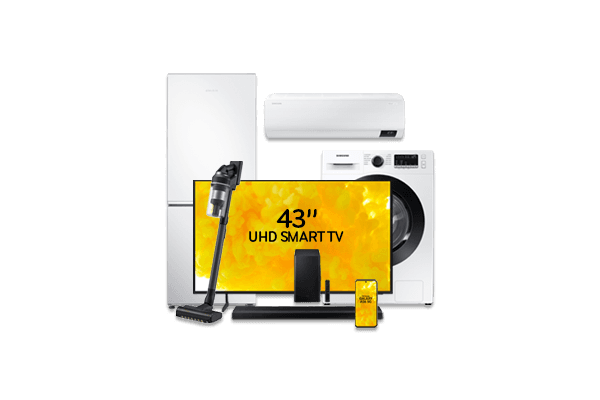
CHOOSE A FREE* SAMSUNG PRODUCT!

When you join for electricity and broadband on a 2-year term. 

*Terms, eligibility and early termination fees apply. Router included, P&H $14.95. Broadband plan availability may vary.

get your first 6 months broadband free*!

Last Chance! Offer ends 23 February 2026.

When you join for electricity and broadband on a 1 year term. 

*Terms, eligibility and early termination fees apply. Router included with wireless broadband plans only. For fibre broadband, bring your own router, or purchase for a monthly payment over 2 years. Broadband plan availability may vary.

GET 3 MONTHS FREE* MOBILE

When you join for any of these offers and add mobile, you'll get the first 3 months of your mobile plan for free! 

*3 Months Free mobile only applies to the monthly charge for your chosen plan. It does not apply to other charges such as Add-Ons, Auto Allowances, or texts/calls outside of what is included with your plan. To retain the 3 Months Free offer on your mobile plan, you need to keep at least one energy or broadband service with Mercury, and stay on the same mobile plan, for the duration of the 3 Months Free offer. If you switch or terminate all your energy and broadband services, or change your mobile plan: 1. in the first month, you will lose three months free; or 2. in the second month you will lose two months free; or 3. in the third month you will lose one month free. A mobile number is only eligible to receive the 3 Months Free offer once. Not available to customers who have had the 3 Months Free mobile offer with Mercury NZ Limited in the last 12 months. General residential and mobile terms apply.

ALREADY A MERCURY CUSTOMER?

If you’re an existing customer and are thinking of adding broadband or mobile, log in to My Account to see what offers are available to you.